
To convert a 4-20 mA signal to 0-10 V, connect a 500 Ω resistor between the analog input and 0 V (GND) and let the loop current flow through it. By Ohm's law (V = I × R), 4 mA gives 2 V and 20 mA gives 10 V, so a 0-10 V input of a PLC reads the sensor as a 2-10 V signal.
This guide shows the wiring of a 2-wire transmitter, a table from mA to volts and ADC counts, the scaling formula to engineering units, how to detect a broken loop and tested Arduino code for an Arduino PLC. It also explains the errors that the resistor and the input impedance add, and when you need an isolated converter instead of a resistor.
What is a 4-20 mA signal?
A 4-20 mA signal is an analog current signal. A transmitter (pressure, level, flow, temperature) sets the current in the loop: 4 mA is the lowest value of its measuring range and 20 mA is the highest. For example, a 0-10 bar pressure transmitter gives 4 mA at 0 bar, 12 mA at 5 bar and 20 mA at 10 bar.
4-20 mA is the standard analog signal for industrial transmitters because the current is the same at every point of a series loop. The resistance of a long cable does not change the value, and the 4 mA "live zero" lets the PLC tell a real zero from a broken wire.
Two properties make 4-20 mA the default choice for field sensors:
- Long cables. A voltage signal loses part of its value in the cable resistance and picks up noise from motors, contactors and drives. In a current loop, the transmitter keeps the current constant as long as the supply has enough voltage, so the cable resistance does not change the reading.
- Live zero. The signal never goes below 4 mA in normal operation. A current near 0 mA can only mean a cut cable, a loose terminal or a transmitter without power.
Most 4-20 mA transmitters are 2-wire devices: the same two wires carry the power and the signal. The loop needs a DC supply, usually 24 Vdc.
A PLC analog input usually measures voltage. On the Arduino PLC (M-Duino and Ardbox), the ESP32 PLC and the Raspberry PLC the analog inputs measure 0 to 10 Vdc (family datasheets). To read a 4-20 mA transmitter on these inputs, you turn the current into a voltage with a resistor.
500 Ω resistor: Ohm's law turns 4-20 mA into 2-10 V
The resistor is a current-to-voltage converter. The voltage across it is the loop current multiplied by its resistance.
500 Ω is the value that puts 20 mA exactly at the top of a 0-10 V input. For a 0-5 V input, use 250 Ω: 4-20 mA becomes 1-5 V. This is the case of an Arduino Uno, Mega or Leonardo board, whose analog pins read 0 to 5 V.
The table shows what a 10-bit, 0-10 V input reads (0 to 1023 counts), as on the M-Duino and the Ardbox. The column "ideal" uses 500 Ω only. The last two columns include the 39 kΩ input impedance of the M-Duino analog input (see the next section).
| Loop current | Voltage, 500 Ω ideal | Counts, ideal | Voltage with 39 kΩ input | Counts with 39 kΩ input | Meaning |
|---|---|---|---|---|---|
| 0 mA | 0 V | 0 | 0 V | 0 | Broken wire or no power |
| 3.6 mA | 1.80 V | 184 | 1.78 V | 182 | Fault limit (NAMUR NE 43) |
| 4 mA | 2.00 V | 205 | 1.98 V | 202 | 0 % of the range |
| 8 mA | 4.00 V | 409 | 3.95 V | 404 | 25 % |
| 12 mA | 6.00 V | 614 | 5.92 V | 606 | 50 % |
| 16 mA | 8.00 V | 818 | 7.90 V | 808 | 75 % |
| 20 mA | 10.00 V | 1023 | 9.87 V | 1010 | 100 % of the range |
| 21 mA | 10.50 V | 1023 (full scale) | 10.37 V | 1023 (full scale) | High fault (NAMUR NE 43) |
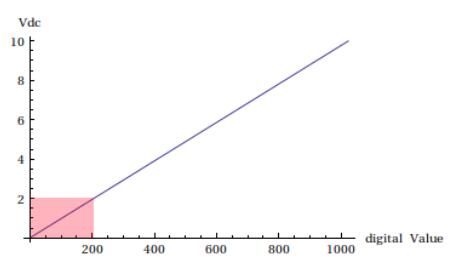
Counts = V / 10 V × 1023, rounded. 4 mA gives 204.6 counts, which the ADC reads as 204 or 205. The graph shows the same straight line from 2 V to 10 V.
Two practical points on the resistor:
- Power. At 20 mA a 500 Ω resistor dissipates P = I² × R = 0.2 W. Use a resistor rated well above this, for example 0.5 W.
- Tolerance. The reading error follows the resistor tolerance one to one: a 5 % resistor gives up to 5 % error. Use a precision resistor (1 % or better) or calibrate the input.
Wiring a 2-wire 4-20 mA transmitter to an Arduino PLC analog input
The resistor goes in parallel with the analog input, between the input terminal and the 0 V of the PLC. The transmitter goes in series in the loop, between the +24 Vdc supply and the input.
- Step 1+24 Vdc to the transmitterConnect the + of the 24 Vdc supply to the + terminal of the transmitter.
- Step 2Transmitter to the inputConnect the - terminal of the transmitter to an analog input, for example I0.7 on an M-Duino.
- Step 3500 Ω to 0 VConnect the resistor between the same input terminal and GND (0 V) of the PLC.
- Step 4Common 0 VThe 0 V of the 24 Vdc supply and the GND of the PLC must be the same reference.
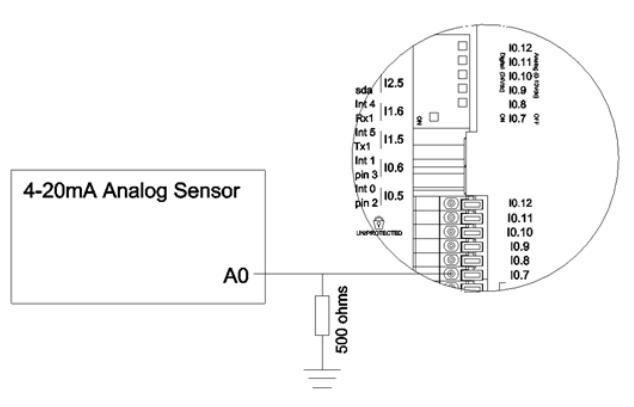
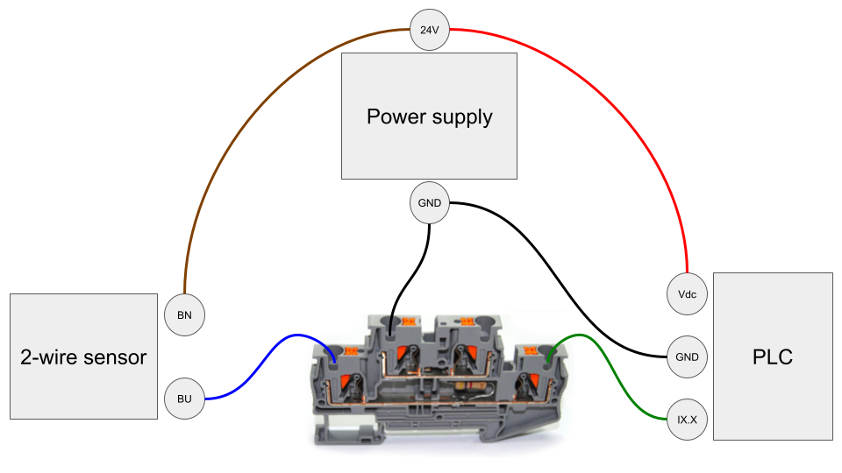
For a 3-wire or 4-wire transmitter, the sensor has its own supply terminals. Connect its current output to the analog input and its signal return to the 0 V of the PLC. The resistor stays between the input and 0 V.
Check the loop voltage. At 20 mA the resistor takes 10 V of the 24 V supply. The transmitter and the cable get the remaining 14 V. The transmitter datasheet gives the minimum supply voltage at its terminals: it must be lower than 14 V minus the voltage drop in the cable (cable resistance × 0.02 A). If it is not, the current stops rising before 20 mA and the top of the range reads low.
On the M-Duino and the Ardbox, the analog inputs are "Analog/Digital" inputs (datasheets): the same terminal reads 0-10 V with analogRead() or a digital level with digitalRead(). For a 4-20 mA loop, read it with analogRead(). Use one resistor for each loop: two transmitters must not share the same resistor or the same input.
Input impedance and ADC resolution change the real reading
The PLC input is not an open circuit. Its input impedance is in parallel with the 500 Ω resistor, so part of the loop current goes into the input and the voltage is a little lower.
- M-Duino and Ardbox: 0 to 10 Vdc, 10 bit, input impedance 39 kΩ (M-Duino family datasheet, Ardbox family datasheet). 500 Ω in parallel with 39 kΩ is 493.7 Ω. The reading is 1.3 % low: 20 mA gives 9.87 V (1010 counts), not 10 V.
- ESP32 PLC: 0 to 10 Vdc, 11 bit, 0 to 2047 counts (ESP32 PLC family datasheet).
- Raspberry PLC: 0 to 10 Vdc, 12 bit, 0 to 4095 counts (Raspberry PLC family datasheet). See analog inputs of the Raspberry PLC.
You have two ways to correct the error. Use the equivalent resistance (493.7 Ω on an M-Duino) in the conversion, as the code below does. Or do a two-point calibration: inject 4.00 mA and 20.00 mA with a loop calibrator, write down the counts and use them as the ends of the scale. Calibration also removes the resistor tolerance, so it is the better option when accuracy matters.
Resolution: on a 10-bit, 0-10 V input one count is 9.8 mV. With 493.7 Ω this is about 0.02 mA, or 0.12 % of the 16 mA span. The 4-20 mA range uses about 808 of the 1024 counts, because the bottom 2 V are the live zero.
Scaling formula from 4-20 mA to engineering units
A 4-20 mA transmitter is linear. To get the process value, remove the 4 mA offset and divide by the 16 mA span:
The same formula works with a level probe (for example 0-250 cm), a temperature transmitter (for example -50 to 150 °C) or a flow meter. Only PVmin and PVmax change. Keep them as constants in the program: if you change the transmitter, you change two numbers.
If you prefer to work directly with counts, use the counts at 4 mA and at 20 mA from the table or from your calibration: PV = PVmin + (counts - counts4mA) / (counts20mA - counts4mA) × (PVmax - PVmin).
Loop fault detection: a broken wire reads below 3.6 mA
The live zero is the diagnostic. The NAMUR NE 43 recommendation defines how a transmitter reports its state with the loop current:
| Loop current | NAMUR NE 43 meaning | What the PLC program should do |
|---|---|---|
| 3.6 mA or less | Fault (low) | Alarm. Do not use the value. Broken wire and no power also read here (0 mA). |
| 3.6 to 3.8 mA | Out of the measuring range | Show the minimum of the range and warn. |
| 3.8 to 20.5 mA | Measurement | Scale with the formula. |
| 20.5 to 21 mA | Out of the measuring range | Show the maximum of the range and warn. |
| 21 mA or more | Fault (high) | Alarm. Do not use the value. |
Limit of a 500 Ω resistor on a 0-10 V input: 20 mA already gives the full 10 V. With the 39 kΩ input of the M-Duino, the input reaches full scale at about 20.3 mA. Above that value the reading stays at 1023 counts, so the PLC cannot tell 20.5 mA from a high fault at 21 mA. Two solutions:
- Set the transmitter to report faults with the low current (3.6 mA or less), if it has this option. The PLC then detects every fault at the bottom of the scale.
- Use a lower resistor, for example 470 Ω. With the 39 kΩ input, 21 mA gives 9.75 V and stays readable. You lose about 6 % of the resolution, and you must use 470 Ω in the conversion.
Never treat a reading below 4 mA as "zero level" or "zero pressure". A pump controlled by a level probe with a cut cable would run dry. The program must go to a safe state and keep a hard-wired protection (a float switch, a pressure switch) that does not depend on the analog signal.
Arduino code: read 4-20 mA, scale it and detect a broken loop
This sketch reads a 0-10 bar transmitter on input I0.7 of an M-Duino with a 500 Ω resistor. It averages 16 samples, converts the counts to mA with the equivalent resistance, checks the loop and scales the value. It compiles for the ATmega2560 of the M-Duino (7.3 KB of flash) and the conversion was tested on a PC with simulated readings from 0 to 21 mA. To compile it, install the Industrial Shields boards in the Arduino IDE: they define the pin names such as I0_7.
// 4-20 mA transmitter on an M-Duino analog input (0-10 Vdc, 10 bit)
// A 500 ohm resistor between the input and GND turns 4-20 mA into 2-10 V.

const uint8_t AI_PIN = I0_7;        // analog input used for the loop

const float ADC_MAX  = 1023.0;      // 10 bit: M-Duino and Ardbox
const float AI_RANGE = 10.0;        // input range in volts
const float R_SHUNT  = 500.0;       // resistor in ohm
const float R_INPUT  = 39000.0;     // input impedance from the datasheet
const float R_EQ = R_SHUNT * R_INPUT / (R_SHUNT + R_INPUT);  // 493.7 ohm

const float PV_MIN = 0.0;           // value at 4 mA (example: 0 bar)
const float PV_MAX = 10.0;          // value at 20 mA (example: 10 bar)

const float MA_FAULT_LOW = 3.6;     // NAMUR NE 43: 3.6 mA or less is a fault
const uint8_t N_SAMPLES = 16;

float readCounts() {
  uint32_t sum = 0;
  for (uint8_t i = 0; i < N_SAMPLES; i++) {
    sum += analogRead(AI_PIN);
  }
  return (float)sum / N_SAMPLES;
}

float countsToMilliamps(float counts) {
  float volts = counts * AI_RANGE / ADC_MAX;
  return volts / R_EQ * 1000.0;
}

void setup() {
  Serial.begin(115200);
  pinMode(AI_PIN, INPUT);
}

void loop() {
  float counts = readCounts();
  float mA = countsToMilliamps(counts);

  Serial.print(mA, 2);
  Serial.print(" mA  ");

  if (mA <= MA_FAULT_LOW) {
    // Broken wire, transmitter without power or a low fault signal
    Serial.println("LOOP FAULT");
  } else if (counts >= ADC_MAX - 1) {
    // The input is at full scale: the real current can be higher
    Serial.println("INPUT AT FULL SCALE");
  } else {
    float pv = PV_MIN + (mA - 4.0) * (PV_MAX - PV_MIN) / 16.0;
    if (pv < PV_MIN) pv = PV_MIN;   // 3.6 to 4 mA: under range
    Serial.print(pv, 2);
    Serial.println(" bar");
  }

  delay(500);
}
To use it on another PLC, change three constants: ADC_MAX (2047 on an ESP32 PLC, 4095 on a Raspberry PLC), R_INPUT (the input impedance of your PLC, or remove the parallel correction and calibrate) and AI_PIN. For more ways to get a stable reading, see how to improve analog reading.
Expected output with a healthy loop at mid scale: 12.00 mA 5.00 bar. With the cable disconnected: 0.00 mA LOOP FAULT.
Resistor or isolated 4-20 mA to 0-10 V converter
A resistor is enough when the PLC, the transmitter supply and the resistor share the same 0 V, inside one cabinet. An active, isolated signal converter is the right choice in other cases.
| Criterion | 500 Ω resistor | Isolated signal converter |
|---|---|---|
| How it works | Ohm's law, passive | Measures the current and generates a new 0-10 V output |
| Galvanic isolation | No: the loop and the PLC share 0 V | Yes: input, output and supply are separated |
| Loop already used by another device | Only if the 0 V references are compatible and the loop voltage is enough | Yes, a typical use |
| Ground loops, long cables between buildings | Risk of offset and noise | Breaks the ground loop |
| Supply | None | Needs its own supply |
| Accuracy | Resistor tolerance plus the input impedance error | Given by the converter datasheet |
For a DIN-rail installation, Industrial Shields has the IS.ACANTO10-0.5k: a 500 Ω resistor with ±1 % tolerance inside a feed-through terminal block, so the conversion sits on the rail next to the PLC.
Hardware and software for the 4-20 mA to 0-10 V example
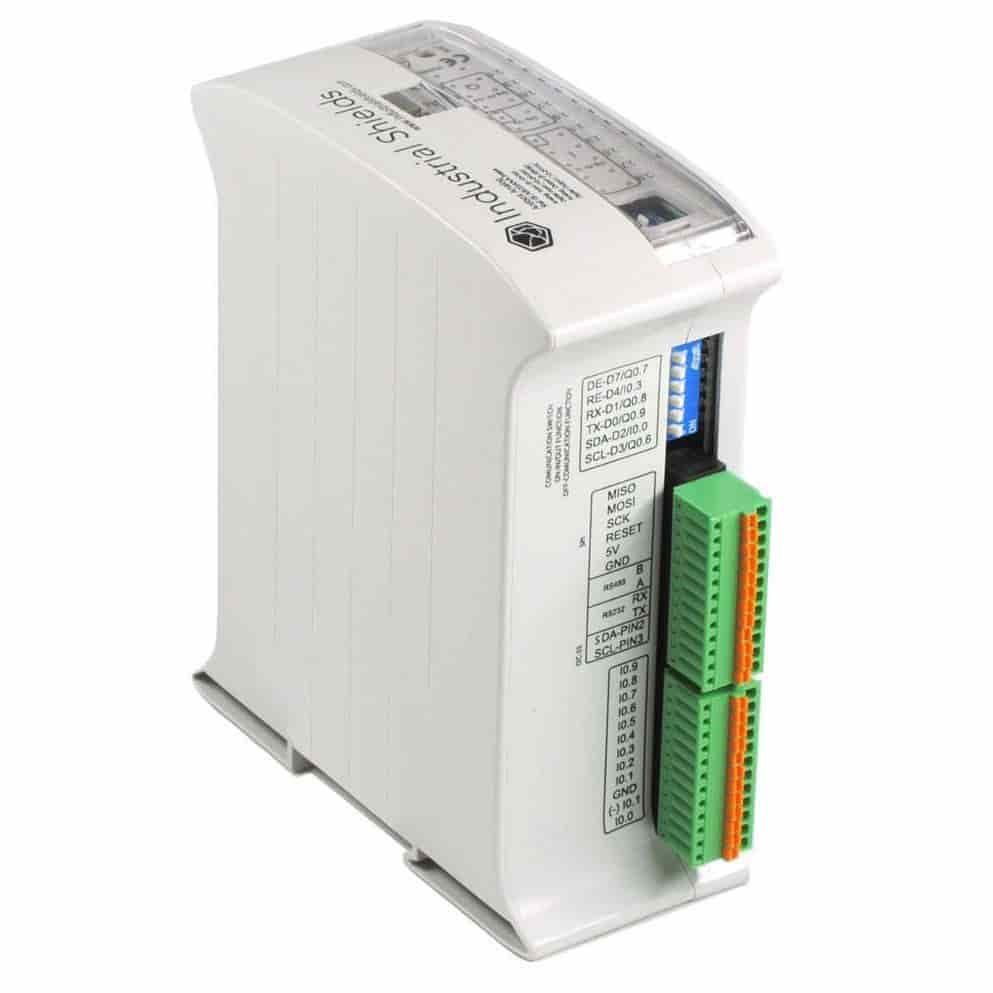
Arduino PLC
M-Duino (Ethernet family) or Ardbox (20 I/Os family). Both have 0-10 V analog/digital inputs with 10-bit resolution.
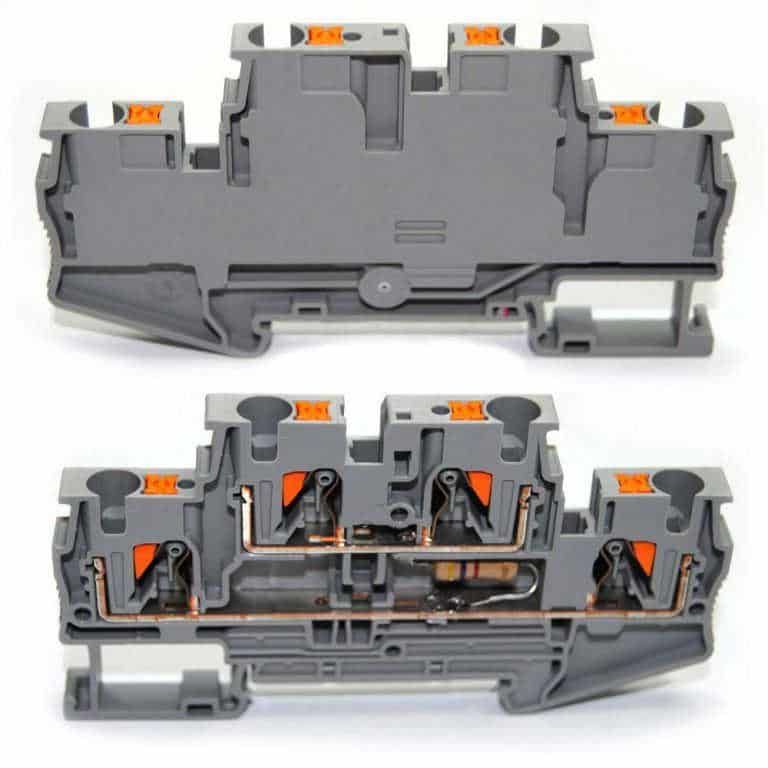
500 Ω resistor
One per loop. A DIN-rail terminal block with a ±1 % resistor, or any 1 % resistor rated for 0.5 W or more.
Arduino IDE
The Arduino IDE with the Industrial Shields boards installed. The "AnalogInput" example of the IDE is a quick first test.
4-20 mA transmitters in PLC projects
- Steam boiler with an ESP32 PLC. The PLC reads the boiler pressure on an analog input and keeps it between 1 and 2 bar. For a 4-20 mA transmitter, the case recommends a 500 Ω precision resistor on the 0-10 V input. Read the steam boiler case study.
- Level probe in a pumping station. A full example with an ESP32 PLC: moving average, scaling to centimetres, broken loop alarm and pump control with hysteresis. 4-20 mA level sensor reading in the PLC Solution Library.
- Tank level with an analog input. How to measure tank level with the analog input of an industrial PLC.
For the basics of analog inputs (resolution, ranges, voltage and current signals), see the basics about analog inputs of an industrial PLC.
Next steps with 4-20 mA signals on a PLC
- Compare the analog inputs of each family in Arduino PLC vs ESP32 PLC vs Raspberry PLC.
- Find more tested examples (sensors, pumps, alarms) in the PLC Solution Library.
- Learn the Arduino IDE on industrial hardware with the free course Programming Arduino on industrial environments.
See the Arduino PLC familyAsk an engineer about your sensors
FAQ about 4-20 mA to 0-10 V conversion
How do I convert 4-20 mA to 0-10 V?
Connect a 500 Ω resistor between the analog input and 0 V and put the input in the loop. The current through the resistor gives 2 V at 4 mA and 10 V at 20 mA. For galvanic isolation, use an isolated signal converter instead.
What voltage does 4 mA give with a 500 Ω resistor?
2 V (0.004 A × 500 Ω). On a 10-bit, 0-10 V input this is about 205 counts, or 202 counts on an M-Duino because of its 39 kΩ input impedance.
Which resistor converts 4-20 mA to 0-5 V?
250 Ω. 4 mA gives 1 V and 20 mA gives 5 V. Use it with inputs that read 0 to 5 V, such as the analog pins of an Arduino Uno, Mega or Leonardo board.
Can I connect a 4-20 mA sensor directly to an Arduino analog pin?
No. The analog pin measures voltage, not current. You need the 250 Ω resistor and a 24 Vdc loop supply, and the pin must never see more than its maximum voltage. An industrial PLC with 0-10 V inputs and a 500 Ω resistor gives more margin.
Why does 4-20 mA start at 4 mA and not at 0 mA?
The 4 mA live zero powers 2-wire transmitters at the bottom of the range and lets the PLC detect faults. A healthy loop never reads below about 3.8 mA, so a reading near 0 mA means a broken wire or a transmitter without power.
How long can a 4-20 mA cable be?
It depends on the loop voltage. The supply voltage minus the 10 V on the resistor and the minimum voltage of the transmitter gives the voltage left for the cable. Divide it by 0.02 A to get the maximum cable resistance (both wires), then use the resistance per metre of your cable.