
Yes, when the Arduino microcontroller works inside an industrial controller. A bare Arduino board, such as the UNO or the Mega 2560, is a development board: 5 V logic pins, no isolation, no enclosure and no ratings for a control cabinet. An Arduino PLC keeps the same microcontroller and the same open software, and adds 24 Vdc inputs and outputs, optocoupled isolation, a protected power supply, DIN rail mounting and CE marking.
This guide separates the meanings of "Arduino" in industry, lists what a bare board does not cover on a machine, and gives a checklist to decide if an Arduino based controller fits your project. The checks start from the machine, not from the programming language, so they are also valid if you program in ladder and not in C++.
Is Arduino suitable for industry?
The answer depends on what "Arduino" means in the question. In industrial automation the word is used for three different things:
- The boardArduino UNO, Arduino Mega 2560 and similar. A printed circuit board with a microcontroller, made for development, prototyping and education.
- The software platformThe Arduino IDE, the C and C++ toolchain and thousands of open source libraries. It runs on many microcontrollers, for example the ATmega2560 and the ESP32.
- Arduino based industrial controllersPLCs that contain an Arduino board or an Arduino compatible microcontroller, with industrial I/O, an enclosure for the cabinet and conformity marking.
The board alone is not made for a control cabinet. The software platform and the Arduino based controllers are used in industry every day, in machines, test benches, building services and remote monitoring.
In industry, the microcontroller is rarely the weak point. The weak points are the electrical interface around it, the mounting and the documentation.
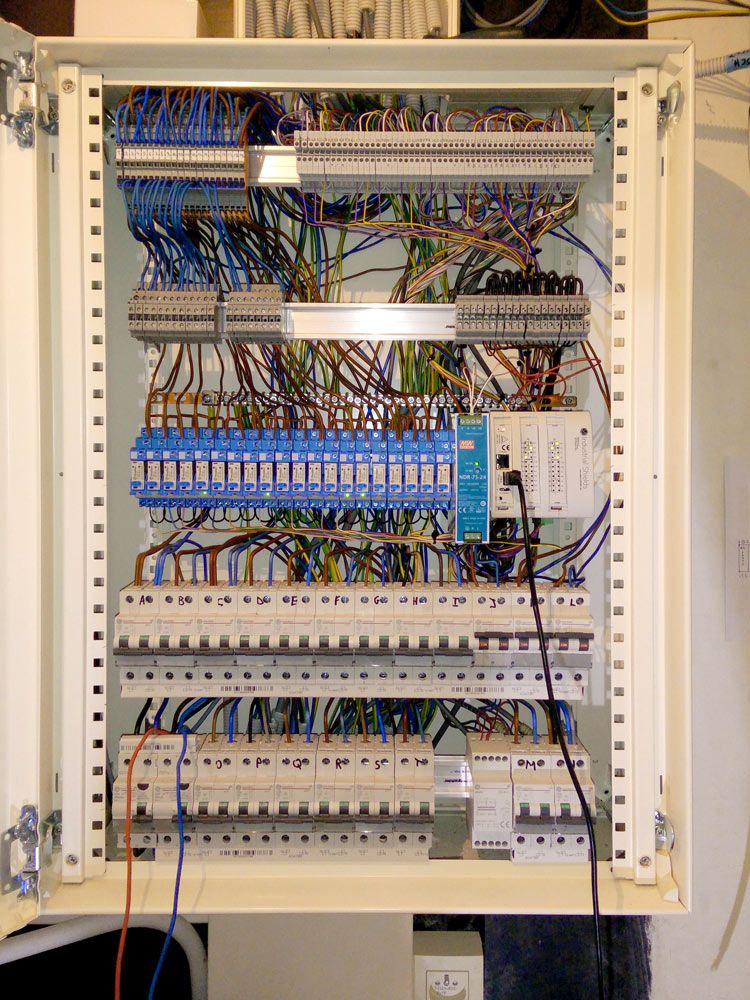
The specifications of each official board are on the Arduino hardware page, and the IDE is on the Arduino software page. For the basics of a PLC (scan cycle, I/O and IEC 61131-3 languages), read what a PLC is and how it works.
Arduino board vs Arduino PLC: what changes in the control cabinet
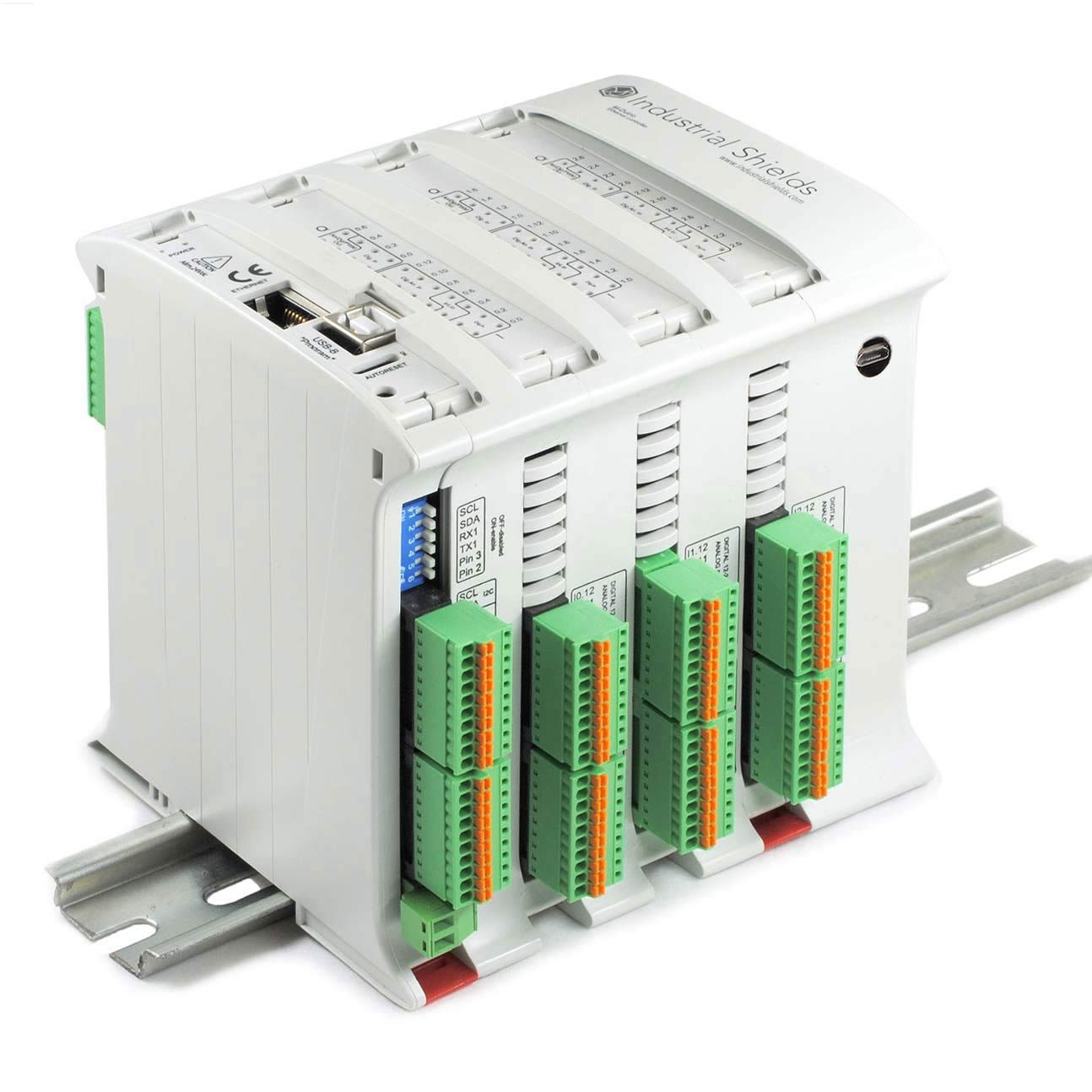
The table compares an Arduino Mega 2560 board with an M-Duino, an Arduino PLC that has an original Arduino Mega 2560 inside. The microcontroller is the same. Everything around it changes. If you need an Arduino programmable logic controller to get started, see the M-Duino 21.
| Feature | Arduino Mega 2560 board | M-Duino (Arduino PLC) |
|---|---|---|
| Microcontroller | ATmega2560, 16 MHz, 256 KB flash, 8 KB SRAM | Same chip: an original Arduino Mega 2560 inside |
| Power supply | 7 to 12 V recommended (6 to 20 V limits) | 12 to 24 Vdc, 2.5 A fuse and polarity protection |
| Digital inputs | 5 V logic pins, no isolation | Rated 24 Vdc (5 to 24 Vdc range), optocoupled |
| Analog inputs | 0 to 5 V, 10 bit | 0 to 10 Vdc, 10 bit |
| Outputs | Logic pins, 40 mA absolute maximum per pin | Optocoupled 24 Vdc outputs (70 mA), 0 to 10 V analog outputs, relays up to 250 Vac 5 A or 30 Vdc 3 A, depending on the model |
| Communications | UART, I2C and SPI at logic level. Ethernet or RS-485 need an extra shield or module | Ethernet, RS-485, RS-232, I2C, SPI and TTL serial on terminals |
| Mounting | Bare printed circuit board | DIN rail TS35, IP20 housing, installed inside a cabinet |
| Environment | No ratings for a control cabinet | 0 to 60 °C operating, 10 to 90 % humidity without condensation |
| Conformity | Development board | CE marking. CE and UKCA certificates on the product page |
Sources: Arduino Mega 2560 Rev3 datasheet, ATmega2560 datasheet (absolute maximum ratings) and M-Duino family datasheet (revision 20250715).
A 24 V sensor wired directly to a 5 V pin can destroy the input. A solenoid valve or a contactor coil cannot run from a logic pin. On a bare board each of these jobs needs an extra circuit: a voltage divider or an optocoupler, a transistor driver or a relay, a regulated supply. Each extra circuit is something the machine builder must design, test and document.
An Arduino PLC ships these circuits already designed, tested and documented in a datasheet. The Arduino PLC family (M-Duino and Ardbox) covers this range of I/O.
Five risks of a bare Arduino board on a machine
These are the problems that appear when a development board goes straight into a cabinet, next to contactors, motors and frequency inverters.

Electromagnetic noise
Contactors, motors and frequency inverters create electrical noise. On a long cable to a 5 V input, a noise pulse can read as a false HIGH. Industrial inputs work at 24 V and use optocouplers, so a small pulse does not change the input state.
Vibrations
Jumper wires and pin headers are not made for vibration. A loose contact on the supply can reset the microcontroller in the middle of a sequence. Terminals and a DIN rail mount hold the wiring in place.

Exposed board and no IP rating
The board is a bare circuit. Dust, metal chips or condensation can short the pins. A controller in an IP20 housing, inside a closed cabinet, keeps conductive parts away from fingers and debris.

No ratings as control equipment
The datasheet of a development board gives pin limits, not ratings for a cabinet: input voltage, isolation, ambient temperature. The machine builder must test and justify the complete circuit. An industrial controller comes with these ratings and its CE certificate.

One supplier for the complete controller
A machine works for many years. Support and spare parts must cover the complete controller: board, I/O circuits and enclosure. With a board plus home made circuits, the builder is the only one who knows the design.
What the Arduino platform brings to industrial control
The reasons to use Arduino technology in industry come from the software and the ecosystem, not from the bare board.

Open source code you can read
The Arduino IDE, the compiler toolchain and the core libraries are open source. You can read every line that runs in the controller, and nothing depends on a closed runtime.

Libraries for industrial protocols
There are open source libraries for Modbus RTU, Modbus TCP, MQTT, sensors and displays. See how to use Modbus RTU with Arduino and ESP32 based PLCs.

Big community
Forums, tutorials and example code cover most hardware and code problems. The official Arduino forum is a good first place to search an error message.

No licence fees
There is no licence per seat or per runtime for the IDE or for the libraries. The cost of the software side is engineering time, not licences.


Modular I/O and communications
On a board, shields add functions such as Ethernet or a relay. On a PLC, the I/O and the ports are already on terminals, and RS-485, Ethernet or I2C connect field devices such as energy meters, frequency inverters and remote I/O.
The software tools for each family are listed on the software page.
Can an Arduino replace a PLC?
A bare Arduino board cannot replace a PLC in a cabinet without extra circuits, mounting and documentation. An Arduino based PLC can do the job of a compact PLC in many machines: digital and analog I/O, timers and sequences, Modbus and Ethernet communication, and data logging.
The main difference is in the program cycle. A classic PLC runtime reads all inputs, runs the program and writes all outputs in a repeating scan cycle, and a watchdog supervises the cycle time. An Arduino sketch runs the loop() function again and again: your code reads the inputs and writes the outputs, and the loop time depends on that code. Good industrial code keeps the loop short, never blocks it, and measures it.
Checklist before you use Arduino technology on a machine
- I/O type and count. Count 24 V digital signals, analog signals (0 to 10 V or 4 to 20 mA) and loads that need relays. For current loops, see how to convert 4 to 20 mA to 0 to 10 V on an Arduino PLC.
- Response time. Write non blocking code with millis() and not delay(), and measure the loop time. See millis() vs delay() on an industrial Arduino.
- Watchdog. Enable a watchdog so the controller restarts in a known state if the program hangs. Example: hardware watchdog on an ESP32 PLC.
- Communications. Decide the fieldbus first: Modbus RTU on RS-485, Modbus TCP or MQTT on Ethernet. Overview: protocols used in industrial automation.
- Grounds and isolation. The M-Duino datasheet warns that there is no galvanic isolation between the grounds of the different systems. Use a common ground reference, or galvanic isolators when devices have different references.
- Safety functions. Emergency stop, guard doors and light curtains need a safety relay or a safety controller rated for the required safety level. This is true for any standard PLC, Arduino based or not.
Arduino PLC in real machines: five case studies
These projects run on Arduino PLCs. Each case study shows the I/O, the wiring logic and the communication used.
| Application | What the Arduino PLC does |
|---|---|
| Automatic car wash | An M-Duino 19R detects the car with a load cell and runs the conveyor, soaping, washing and drying with timers and four relay outputs. |
| Conveyor speed control | An M-Duino 42+ sets the conveyor speed through a frequency inverter, reads the motor current and shares live values with a Panel PC over Ethernet. |
| Concrete batching plant | An M-Duino doses aggregate and cement by weight and water by volume, runs belts and mixer on relays and sends batch data by LoRa. |
| Bottle labelling conveyor | An encoder on interrupt inputs, a photocell and two stepper motors keep each label in sync with the line. |
| Automated warehouse | One M-Duino stores boxes by weight on three axes and ships them to several docks, with QR check-in and a load cell. |
Arduino PLC, ESP32 PLC and Raspberry PLC: one open ecosystem
The same open approach exists on three hardware platforms. Choose by the job the controller must do:
| Family | Programming | Typical job |
|---|---|---|
| Arduino PLC | Arduino IDE (C and C++), OpenPLC | Machine control with many I/O, sequences, Modbus RTU and Modbus TCP |
| ESP32 PLC | Arduino IDE (C and C++), OpenPLC | Dual core controller with Ethernet, Wi-Fi and Bluetooth: IIoT, MQTT and remote sites |
| Raspberry PLC | Linux: CODESYS, Node-RED, Python | Control plus HMI, database, gateway and edge computing in one device |
A detailed comparison with selection criteria is in Arduino PLC vs ESP32 PLC vs Raspberry PLC.
Next step: test your machine logic on an Arduino PLC
Install the Industrial Shields boards in the Arduino IDE with this guide, or start with ladder logic in OpenPLC on an Arduino Mega. The PLC Solution Library has functions from real installations that you can reuse.
See the Arduino PLC familyOpen the PLC Solution LibraryAsk an engineer about your machine
FAQ about Arduino in industrial automation
Is Arduino reliable enough for 24/7 operation?
Reliability depends on the hardware around the microcontroller and on the code. With a protected 24 V supply, isolated I/O, a cabinet, a watchdog and non blocking code, an Arduino based controller can run a machine continuously. A bare board with jumper wires is not a good reference for this.
Can I connect a 24 V sensor to an Arduino?
Not directly to a board pin. The pins of an Arduino Mega 2560 work at 5 V. You need a voltage divider or an optocoupler for each input, or a controller with 24 Vdc inputs such as an M-Duino.
Can an Arduino be programmed in ladder logic?
Yes. OpenPLC compiles IEC 61131-3 programs, including Ladder Diagram, for the Arduino Mega and for M-Duino, Ardbox and ESP32 PLC. Start with first steps with OpenPLC and Arduino Mega.
What is the difference between an Arduino and a PLC?
An Arduino board is a development board with logic level pins. A PLC is a controller built for the industrial environment: rated I/O, protected supply, an enclosure for the cabinet and a program that runs in a repeating cycle. An Arduino PLC puts the Arduino microcontroller inside that industrial hardware.
Are Arduino based PLCs certified?
The M-Duino family carries CE marking, and its CE and UKCA certificates are published on the product page. Check the product page of each family for its certificates.
Which Arduino board is inside an M-Duino?
An original Arduino Mega 2560, with the ATmega2560 microcontroller at 16 MHz, 256 KB of flash (8 KB used by the bootloader), 8 KB of SRAM and 4 KB of EEPROM.