
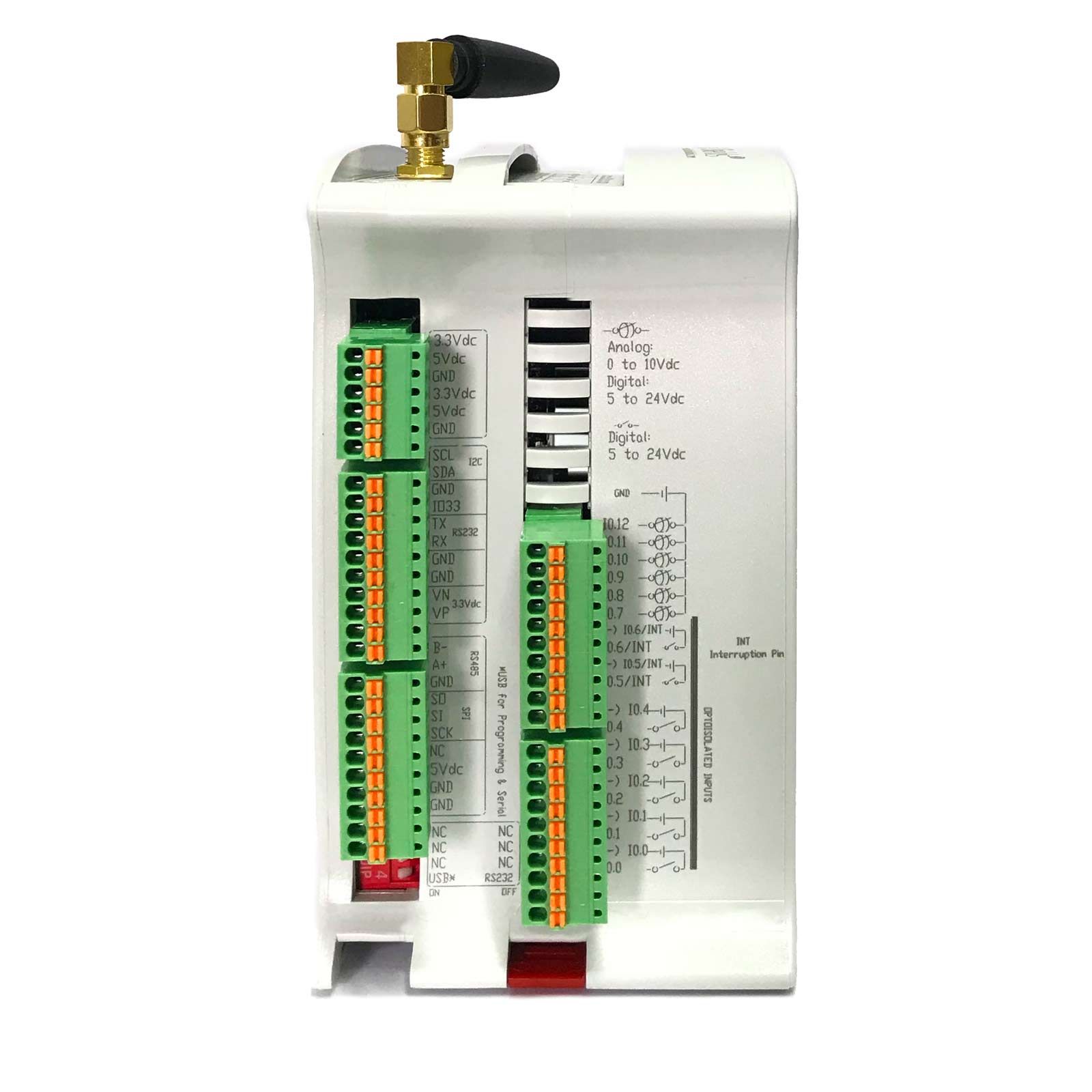
To use SPI on an ESP32 PLC, wire the device to the SO (MISO, GPIO 19), SI (MOSI, GPIO 23) and SCK (GPIO 18) terminals, use a free logic pin such as GPIO 0 as chip select, and send data with the Arduino SPI library inside SPI.beginTransaction() and SPI.endTransaction(). The external SPI port of the ESP32 PLC is the VSPI bus (SPI3) of the ESP32 and works at 3.3 V.
The same bus also serves the Ethernet controller and the µSD card of the PLC. Because of this, each device needs its own chip select, and your code must not change the bus settings outside a transaction. This guide covers the SPI signals and modes, the SPI controllers and default pins of the ESP32, the SPI terminals of the ESP32 PLC, the rules for a shared bus, Arduino code and a checklist for the first transfer. The sections on SPI modes and ESP32 pins apply to any ESP32 board.
| SPI on the ESP32 PLC | Value |
|---|---|
| ESP32 bus | VSPI (SPI3), the default SPI object in Arduino |
| MISO (master in) | Terminal SO, GPIO 19 |
| MOSI (master out) | Terminal SI, GPIO 23 |
| Clock | Terminal SCK, GPIO 18 |
| Chip select | No fixed pin. Use a free logic pin, for example the GPIO 0 terminal |
| Logic level | 3.3 V, direct from the ESP32 |
| Role | Master. The Arduino SPI library doesn't support slave mode |
| Shared with | Ethernet controller and µSD card |
How does SPI communication work?
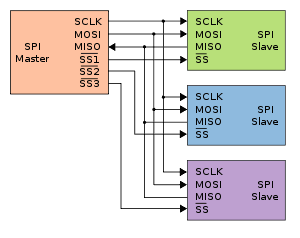
SPI (Serial Peripheral Interface) is a synchronous, full duplex serial bus with one master and one or more slaves. The master generates the clock. On every clock pulse, one bit goes out on MOSI and one bit comes in on MISO. A transfer always sends and receives the same number of bits, so to read a byte the master sends a byte, often a dummy 0x00.
- SCK (also SCLK): the clock from the master. The slaves never drive it.
- MOSI (Master Out Slave In): data from the master to the slave.
- MISO (Master In Slave Out): data from the slave to the master. Only the selected slave drives this line.
- CS (Chip Select, also SS for Slave Select): one line per slave, active low. The slave listens only while its CS is low.
Some newer datasheets use other names for the same lines: COPI and CIPO, or SDO and SDI seen from each device.
SPI modes: clock polarity and clock phase
The master and the slave must agree on when the data is valid. Two settings define it. CPOL is the level of the clock when the bus is idle. CPHA says if the data is sampled on the first or on the second clock edge. Together they give four SPI modes. The datasheet of the slave tells you the mode, as a mode number, as CPOL and CPHA values, or as a timing diagram.
| Mode | CPOL | CPHA | Clock when idle | Data sampled on | Arduino constant |
|---|---|---|---|---|---|
| 0 | 0 | 0 | Low | Rising edge | SPI_MODE0 |
| 1 | 0 | 1 | Low | Falling edge | SPI_MODE1 |
| 2 | 1 | 0 | High | Falling edge | SPI_MODE2 |
| 3 | 1 | 1 | High | Rising edge | SPI_MODE3 |
The other two settings are the clock frequency and the bit order. Most devices send the most significant bit first (MSBFIRST). In Arduino, SPISettings keeps the three values together: clock, bit order and mode.
ESP32 SPI controllers: SPI0 and SPI1 for the flash, HSPI and VSPI for your devices
The original ESP32 has four SPI controllers. SPI0 and SPI1 connect the chip to its flash memory (and PSRAM, if there is one), so you can't use them for your devices. SPI2 and SPI3 are general purpose SPI controllers. In Arduino they are called HSPI and VSPI.
| Controller | Arduino name | Use | SCK | MISO | MOSI | CS |
|---|---|---|---|---|---|---|
| SPI0, SPI1 | none | Internal flash and PSRAM | Not available for your devices | |||
| SPI2 | HSPI | General purpose | GPIO 14 | GPIO 12 | GPIO 13 | GPIO 15 |
| SPI3 | VSPI | General purpose, default SPI object | GPIO 18 | GPIO 19 | GPIO 23 | GPIO 5 |
Default pins of SPI2 and SPI3 (IO_MUX pins), from the ESP-IDF SPI Master documentation.
These default pins connect to the controller directly through the IO_MUX. Espressif gives up to 80 MHz on these pins. The ESP32 can also route SPI to other pins through the GPIO matrix, but then the limit is 40 MHz, and about 26 MHz for full duplex transfers. In practice, the slave and the wiring set a much lower limit than the ESP32. Other chips of the family, such as the ESP32-S3, use different pins and call the general purpose bus FSPI. See the ESP-IDF SPI Master documentation for the details.
SPI terminals on the ESP32 PLC
The ESP32 PLC family (models 19R to 58 in the ESP32 PLC family datasheet) has an external SPI port connected to VSPI (SPI3). The datasheet gives the SPI port as 3.3 V, direct from the ESP32 CPU. You don't need to change any DIP switch to use it. The PLC needs its normal 12 to 24 Vdc supply.
| Function | PLC terminal | ESP32 pin | Level |
|---|---|---|---|
| MISO | SO | GPIO 19 | 3.3 V |
| MOSI | SI | GPIO 23 | 3.3 V |
| Clock | SCK | GPIO 18 | 3.3 V |
| Chip select | Your choice, for example GPIO 0 | Set in your code | Depends on the pin (GPIO 0 is 5 V) |
There is no terminal for chip select. You choose a free logic pin and drive it from your code, as in the examples below. Don't use a 24 V digital output (a Q terminal) as chip select: its level and its switching time don't match an SPI device.
Check the chip select level. In our ESP32 PLC pinout time analysis, the GPIO 0 terminal works at 5 V, with rise and fall times of about 5 µs. The SI, SO and SCK lines work at 3.3 V. If your device has a 3.3 V chip select input that is not 5 V tolerant, add a level shifter on CS. The ESP32 pins are not 5 V tolerant either: a 5 V device needs a level shifter on its MISO output.
When you don't use SPI or Ethernet, the SO, SI and SCK terminals can also work as general digital inputs or outputs. The same pinout analysis gives their rise and fall times (about 100 ns).
Ethernet, µSD card and your SPI device share one bus
Inside the ESP32 PLC, the Ethernet controller, the µSD card and the external SPI port all use the same SPI bus (SPI3). Communication boards in the expansion slots can also use SPI with their own chip select: the CAN SPI board guide uses CS 32 in expansion slot 1 and CS 2 in slot 2. A shared bus works well if every device follows the same rules.
- 1 · Take the busbeginTransaction()Loads the clock, bit order and mode of your device. In the ESP32 Arduino core it also locks the bus until endTransaction().
- 2 · SelectCS lowOnly your device listens. The CS lines of Ethernet and the µSD card stay high.
- 3 · Exchangetransfer()Send and receive the bytes of one command, as the device datasheet describes.
- 4 · ReleaseCS high, endTransaction()Your device leaves the bus, and Ethernet and the µSD card can use it again.
Rule Keep CS low only between beginTransaction() and endTransaction().
- Set CS high before anything else. In
setup(), configure your CS pin as an output and set it high before you start Ethernet, the µSD card or SPI. A floating CS can make your device answer during Ethernet traffic. - Use a transaction for every access. Ethernet and the µSD card use their own clock and mode. If your code changes the settings outside a transaction, the next Ethernet or µSD access can fail.
- Don't call
SPI.end()and don't callSPI.begin()with other pins while Ethernet or the µSD card are in use. It stops the bus for all devices. - Check that your device releases MISO. When its CS is high, the device must put MISO in high impedance. Some devices keep driving MISO. On a shared bus they block Ethernet and the µSD card, and need a tri-state buffer with an enable input.
- Keep transfers short. While your device holds the bus, Ethernet and the µSD card wait. Read one value per transaction instead of a long block.
The µSD card is a typical case: the PLC writes data to the card while the network is down, and Ethernet or MQTT sends it later. The Solution Library shows this pattern in SD card datalogging on an ESP32 PLC with daily files.
Arduino code for an SPI device on the ESP32 PLC
Install the Industrial Shields ESP32 boards package in the Arduino IDE (see how to install Industrial Shields boards in the Arduino IDE) and select your ESP32 PLC model in Tools. The SPI.h library of the package is the Arduino SPI library for the ESP32. It works as master only.
Basic master example: send one byte and print the answer
This sketch sends the character '0' every 100 ms and prints the byte that the slave returns. The library doesn't control CS, so the sketch drives it. Replace the clock, bit order and mode with the values of your device datasheet.
// SPI master example for the ESP32 PLC family
#include <SPI.h>

const int csPin = GPIO_0;              // chip select: GPIO 0 terminal (5 V)
const uint32_t spiClock = 1000000;     // 1 MHz: start low, raise it after the first tests

SPISettings deviceSettings(spiClock, MSBFIRST, SPI_MODE0);

uint8_t spiExchange(uint8_t out) {
  SPI.beginTransaction(deviceSettings); // take the bus with the settings of this device
  digitalWrite(csPin, LOW);             // select the device
  delayMicroseconds(10);                // GPIO 0 edges take about 5 us
  uint8_t in = SPI.transfer(out);       // send one byte and receive one byte
  digitalWrite(csPin, HIGH);            // release the device
  delayMicroseconds(10);                // let CS reach the high level
  SPI.endTransaction();                 // free the bus for Ethernet and the uSD card
  return in;
}

void setup() {
  Serial.begin(115200);
  pinMode(csPin, OUTPUT);
  digitalWrite(csPin, HIGH);            // keep the device off the bus during start-up
  SPI.begin();                          // VSPI: SCK GPIO 18, MISO GPIO 19, MOSI GPIO 23
}

void loop() {
  uint8_t answer = spiExchange('0');
  Serial.print("Received: 0x");
  Serial.println(answer, HEX);
  delay(100);
}
If Ethernet or the µSD card already started the bus, SPI.begin() doesn't start it again, so the order in setup() is not critical. What matters is that CS is high before the first transfer on the bus.
Read a 16-bit register
Most SPI devices work with commands: the master sends a command or register address, then sends dummy bytes to clock the answer in. The command byte and the length of the answer come from the device datasheet. This function reuses the settings of the example above.
uint16_t readRegister16(uint8_t command) {
  SPI.beginTransaction(deviceSettings);
  digitalWrite(csPin, LOW);
  delayMicroseconds(10);
  SPI.transfer(command);                // send the command or register address
  uint8_t high = SPI.transfer(0x00);    // dummy byte: clock in the first byte
  uint8_t low = SPI.transfer(0x00);     // dummy byte: clock in the second byte
  digitalWrite(csPin, HIGH);
  delayMicroseconds(10);
  SPI.endTransaction();
  return (uint16_t(high) << 8) | low;
}
Some devices need CS to stay low for the whole command, others need a pulse on CS between commands. Follow the timing diagram of the device. It is the most common source of wrong readings.
A second SPI bus with SPIClass on other ESP32 boards
On the ESP32 PLC, the external SPI port is VSPI, so you use the default SPI object. On an ESP32 board where HSPI is free, you can create a second bus with its own instance of SPIClass. Each bus then has its own clock and data lines.
#include <SPI.h>

SPIClass hspi(HSPI);                   // second SPI bus (SPI2)
const int hspiCs = 15;

void setup() {
  Serial.begin(115200);
  pinMode(hspiCs, OUTPUT);
  digitalWrite(hspiCs, HIGH);
  hspi.begin(14, 12, 13, hspiCs);      // SCK, MISO, MOSI, SS
}

void loop() {
  hspi.beginTransaction(SPISettings(1000000, MSBFIRST, SPI_MODE0));
  digitalWrite(hspiCs, LOW);
  uint8_t in = hspi.transfer(0x00);
  digitalWrite(hspiCs, HIGH);
  hspi.endTransaction();
  Serial.println(in, HEX);
  delay(100);
}
Check the boot pins before you use HSPI: on the ESP32, GPIO 12 and GPIO 15 are strapping pins, and a device that pulls them to the wrong level during reset can stop the board from booting.
SPI wiring in a control cabinet
SPI is a bus for short connections between chips. It has no differential signals and no error check in the protocol. On a PLC, it is the right choice for a device that sits next to the controller, such as an external ADC, a thermocouple or RTD converter, a display or a memory chip.
- Keep the device close. Mount it in the same cabinet as the PLC, with short wires. Long wires add capacitance and reflections, and the clock edges get worse.
- Lower the clock when the wires get longer. Start at 1 MHz or less, check the data, then raise the clock step by step.
- Share the ground. Connect the GND of the device to the GND of the PLC, and run it next to the signal wires.
- Keep SPI away from noise. Route the wires away from relay outputs, contactors and motor cables.
- Use a field bus for long distances. If the signal leaves the cabinet, use RS-485 with Modbus RTU, Ethernet or a 4-20 mA loop instead of SPI.
First SPI transfer: what to check when the data is wrong
| Symptom | Likely cause | What to check |
|---|---|---|
| You always read 0xFF | Nobody drives MISO | CS wiring and CS pin in the code, device power, MISO wire on the SO terminal |
| You always read 0x00 | MISO held low, or the device is in reset or not configured | MISO wiring, reset or enable pins of the device, start-up time after power on |
| Values are almost right, but shifted by one bit | Wrong SPI mode | CPOL and CPHA in the datasheet, then the mode in SPISettings |
| Values are wrong at random | Clock too fast for the wiring, or noise | Lower the clock, shorten the wires, check the ground |
| Your device works, but Ethernet or the µSD card fail | The device answers when it is not selected, or the settings change outside a transaction | CS high in setup, transactions around every access, MISO released when CS is high, no SPI.end() |
| Your device works alone, but fails when Ethernet is active | CS low outside the transaction, or no lock between tasks | CS low only between beginTransaction() and endTransaction(), all SPI accesses inside transactions |
A logic analyser or an oscilloscope on SCK, MOSI, MISO and CS shows most of these problems in one capture. In the Ethernet connection test, you can check that Ethernet still works after you add your device.
Summary of SPI on the ESP32 PLC

- The external SPI port of the ESP32 PLC is VSPI (SPI3): SO is MISO (GPIO 19), SI is MOSI (GPIO 23) and SCK is the clock (GPIO 18), all at 3.3 V.
- Chip select is a pin you choose and drive in your code. Check its voltage against the device.
- Ethernet, the µSD card and your device share the bus: CS high at start-up, one transaction per access, no
SPI.end(). - SPI is for devices inside the cabinet. For signals in the field, use RS-485, Ethernet or 4-20 mA.
From SPI to a working station. The railway carriage monitoring case uses an ESP32 PLC 57R that keeps the data on board when the 4G link drops and sends it when the link returns.
Read the railway carriage case study
To compare models and I/O, see the ESP32 PLC family.
More about SPI and buses on industrial PLCs
- SPI bus on an Arduino PLC (M-Duino)
- SPI bus on a Raspberry PLC
- How to use the CAN SPI board with the ESP32 PLC family
- Testing CAN SPI communication on the ESP32 PLC 14
- Analysis of the ESP32 PLC pinout time response
- Improved Ethernet library for M-Duino and ESP32 PLCs
- Basics with the SD card in an industrial PLC
- I2C bus on an industrial PLC
- Basics about RS-485 on an industrial PLC
- PLC Solution Library: tested functions for ESP32 PLC, Arduino PLC and Raspberry PLC
FAQ about SPI on the ESP32 and the ESP32 PLC
What are the default SPI pins of the ESP32?
For VSPI (SPI3), the bus of the default SPI object in Arduino: SCK GPIO 18, MISO GPIO 19, MOSI GPIO 23 and CS GPIO 5. For HSPI (SPI2): SCK GPIO 14, MISO GPIO 12, MOSI GPIO 13 and CS GPIO 15. SPI0 and SPI1 are for the internal flash.
Which SPI bus does the ESP32 PLC use?
The external SPI port of the ESP32 PLC family is VSPI (SPI3): terminal SO is MISO (GPIO 19), SI is MOSI (GPIO 23) and SCK is the clock (GPIO 18). The Ethernet controller and the µSD card use the same bus.
Can the ESP32 PLC work as an SPI slave?
Not with the Arduino SPI library, which works as master only. On the ESP32 PLC the ESP32 is also the master of Ethernet and the µSD card on the same bus. To connect two PLCs, use RS-485, Ethernet or CAN.
Can I connect a 5 V SPI device to the ESP32 PLC?
Not directly. The SPI lines of the PLC work at 3.3 V and the ESP32 pins are not 5 V tolerant, so a 5 V MISO signal needs a level shifter. Some 5 V devices also don't read 3.3 V as a valid high level on their inputs.
Why does Ethernet stop working when I add an SPI device?
The usual causes are a CS that floats or stays low, a device that keeps driving MISO when it is not selected, a call to SPI.end(), or settings changed outside SPI.beginTransaction(). Set CS high in setup() and put every access inside a transaction.
What is the difference between SPI and I2C on a PLC?
SPI uses separate data lines in each direction, a clock and one CS line per device, and runs at higher clock rates. I2C uses two shared lines and selects each device by address. On the ESP32 PLC, I2C works at 5 V and SPI at 3.3 V. Both are for devices inside the cabinet.
How fast can SPI run on the ESP32?
Espressif gives up to 80 MHz on the default IO_MUX pins. Through the GPIO matrix the limit is 40 MHz, and about 26 MHz for full duplex transfers, which is how the Arduino SPI library works. On a PLC, the slave datasheet and the wiring set the real limit. Start at 1 MHz or less and raise the clock while the data stays correct.