
Complete guide: Modbus RTU and TCP with Python and Node-RED
To write and read a coil over Modbus TCP from a Raspberry PLC in Python, install pymodbus in a virtual environment, connect with ModbusTcpClient(host, port=502), and call write_coil(address, value, device_id=...) (function code 05) and read_coils(address, count=1, device_id=...) (function code 01). The examples of this post were tested with pymodbus 3.16.1. The first version of this post used the device ID as a positional argument, which fails with pymodbus 3.8 and later.
This is part 4 of the Modbus and Raspberry PLC series. Parts 1 and 2 use Node-RED, and parts 3 and 4 use Python. All the details, such as timeouts, addressing, 32-bit values and troubleshooting, are in the Modbus guide for Raspberry Pi PLCs.
What you need
- A Raspberry PLC. It is the Modbus TCP client (master).
- A Modbus TCP server (slave): a meter, a drive, another PLC or a gateway. To test without a device, run the Python Modbus TCP server of the Modbus guide on the same PLC, and use
127.0.0.1and port5020in the scripts. - An Ethernet connection between the PLC and the slave, with both in the same subnet. By default,
eth0of the Raspberry PLC has the address 10.10.10.20. To change it, see how to configure a static IP on a Raspberry PLC. - The IP address, the TCP port and the unit identifier of the slave. This post uses a slave at 10.10.10.4, port 502, device ID 1.
Install pymodbus
Install pymodbus with pip in a virtual environment, and fix the version. Raspberry Pi OS Bookworm and later block pip install outside a virtual environment, and the version that apt installs depends on the OS release. pymodbus changes its API between versions, so the version decides if an example runs. This is the same environment as in part 3. The [serial] option is for Modbus RTU, and Modbus TCP works without it.
python3 -m venv ~/modbus-venv
source ~/modbus-venv/bin/activate
pip install "pymodbus[serial]==3.16.1"
Write a coil with Python (FC05)
Save this code as tcp_write_coil.py:
from pymodbus.client import ModbusTcpClient
from pymodbus.exceptions import ModbusException

HOST = "10.10.10.4"  # IP address of the Modbus TCP slave
PORT = 502           # Modbus TCP port of the slave
DEVICE_ID = 1        # unit identifier, see the device manual (often 1 or 255)
COIL = 0             # coil address (coil 00001 in the device manual is address 0)

client = ModbusTcpClient(HOST, port=PORT, timeout=2)
if not client.connect():
    raise SystemExit(f"No connection to {HOST}:{PORT}")

try:
    rr = client.write_coil(COIL, True, device_id=DEVICE_ID)  # FC05
    if rr.isError():
        print("Exception response:", rr)
    else:
        print(f"Coil {COIL} set to ON")
except ModbusException as exc:
    print("No valid answer:", exc)  # timeout or closed connection
finally:
client.close()- Imports.
ModbusTcpClientis the Modbus TCP client, andModbusExceptioncatches the cases where no valid answer comes back. - Slave.
HOSTandPORTselect the device.DEVICE_IDis the unit identifier: on Modbus TCP many devices ignore it, others answer only to 1 or 255, and a gateway uses it to select the RTU slave behind it. Use the value of the device manual. - Client.
timeout=2waits two seconds for each answer.connect()returnsFalseif the TCP connection fails. - Write.
write_coil(COIL, True, device_id=DEVICE_ID)sends function code 05. UseFalseto turn the coil off. - Two kinds of error.
rr.isError()is an exception response: the slave answered but refused the request.ModbusExceptionmeans that no valid answer came back.
Run it with the virtual environment active:
python tcp_write_coil.pyCoil 0 set to ON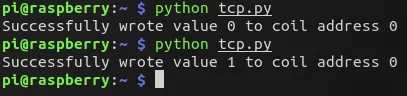
Write and read a coil in a loop (FC05 and FC01)
This version changes the coil every second and reads it back to check the value:
import time

from pymodbus.client import ModbusTcpClient
from pymodbus.exceptions import ModbusException

HOST = "10.10.10.4"
PORT = 502
DEVICE_ID = 1
COIL = 0

client = ModbusTcpClient(HOST, port=PORT, timeout=2)

state = True
try:
    while True:
        if not client.connected and not client.connect():
            print(f"No connection to {HOST}:{PORT}, new try in 5 s")
            time.sleep(5)
            continue
        try:
            wr = client.write_coil(COIL, state, device_id=DEVICE_ID)      # FC05
            rr = client.read_coils(COIL, count=1, device_id=DEVICE_ID)    # FC01
            if wr.isError() or rr.isError():
                print("Exception response:", wr if wr.isError() else rr)
            else:
                print(f"Wrote {state}, read back {rr.bits[0]}")
                state = not state
        except ModbusException as exc:
            print("No valid answer:", exc)
            client.close()  # reconnect in the next cycle
        time.sleep(1)
except KeyboardInterrupt:
    pass
finally:
    client.close()
read_coils(COIL, count=1, device_id=DEVICE_ID)sends function code 01. The answer packs the coils in bytes, sorr.bitshas 8 values even if you read one coil. The first one,rr.bits[0], is the coil you asked for.- The script checks the answer of the write and of the read. The coil changes state only after a correct cycle.
- The client keeps the TCP connection open. If the slave closes it or stops answering, the script closes the client and connects again in the next cycle, so a restart of the slave does not stop the loop.
- Press Ctrl+C to stop. The connection is closed in
finally.
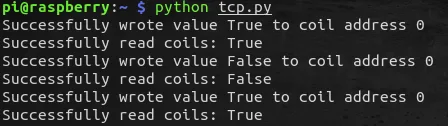
Output of our test:
Wrote True, read back True
Wrote False, read back False
Wrote True, read back True
Wrote False, read back False
In the same test we stopped the simulated slave during the loop. The script printed No valid answer: Modbus Error: [Connection] ..., then No connection to ..., new try in 5 s, and went on with Wrote True, read back True when the slave was back.
Errors with older examples
The first version of this post used client.write_coil(address, value, 1), with the device ID as a positional argument, and client.read_coils(address, quantity) without a device ID. We ran it against a simulated slave with several pymodbus versions:
| pymodbus | Result of the first version |
|---|---|
| 2.5.3 | ImportError: cannot import name 'ModbusTcpClient' from 'pymodbus.client' |
| 3.0.2 and 3.6.9 | The write works. The read goes to device ID 0, the default of these versions, and our slave with device ID 1 answers with an exception |
| 3.7.4 | Write and read work |
| 3.8.6, 3.9.2, 3.10.0 and 3.16.1 | TypeError: ModbusClientMixin.write_coil() takes 3 positional arguments but 4 were given |
| Error | Cause | Fix |
|---|---|---|
takes 3 positional arguments but 4 were given | pymodbus 3.8 and later accept the parameters after the value only as keywords | write_coil(0, True, device_id=1) |
unexpected keyword argument 'slave' | pymodbus 3.10 and later call it device_id | device_id=1 |
cannot import name 'ModbusTcpClient' from 'pymodbus.client' | pymodbus 2.x | Install pymodbus 3 in a virtual environment |
Connection refused or no connection | The server does not run, wrong IP address or port, firewall, different subnet | ping the slave, check the port in its manual |
| Exception response with code 02 | The coil address does not exist in the slave | The coil table in the manual of the slave |
What we tested. Python 3.13 and pymodbus 3.16.1 on Linux, with a simulated Modbus TCP slave (pymodbus 3.16.1, device ID 1) on 127.0.0.1. Both scripts ran with only the host and the port changed, and gave the output shown above. We also tested the loop with the slave stopped and started again, a wrong device ID (exception response) and no server (no connection). The first version was run the same way with pymodbus 2.5.3, 3.0.2, 3.6.9, 3.7.4, 3.8.6, 3.9.2, 3.10.0 and 3.16.1. We did not run this update on Raspberry PLC hardware: the two screenshots come from the first version of the post.
Modbus TCP from Python with a real device. In the Schneider Altivar 320 example, a Python program on a Raspberry Pi starts the drive over Modbus TCP, sets the speed reference and reads status, current and pressure. It also shows why the drive answers on unit ID 255.
FAQ about Modbus TCP with Python
Which device ID do I use with Modbus TCP?
The value of the device manual. The IP address selects the device, and many devices ignore the device ID. Others answer only to 1 or 255, and a gateway uses it to select the RTU slave behind it. pymodbus 3.7 and later send 1 if you do not give a device ID.
Why does read_coils return 8 values?
Because the answer carries the coils in whole bytes. pymodbus returns all the bits of those bytes. Use only the first count values.
Can I install pymodbus with apt?
You can, but you get the version of your OS release, which may have a different API from the examples. A virtual environment with a fixed version gives the same result on every PLC.
Should I open and close the connection in every cycle?
No. Keep the TCP connection open and close it only after an error, as in the loop of this post. A new connection every second adds traffic and load on the slave, and some devices accept only a few connections.
How do I do the same over RS-485?
With ModbusSerialClient and framer=FramerType.RTU. See part 3: Modbus RTU and Python.
More about Modbus on the Raspberry PLC
- Modbus TCP and RTU guide for Raspberry Pi PLCs: Python and Node-RED examples
- How to use pymodbus with a Raspberry Pi PLC: async examples
- Part 1: Modbus RTU and Node-RED
- Part 2: Modbus TCP and Node-RED
- Part 3: Modbus RTU and Python
- Fronius inverter over SunSpec Modbus TCP with a Raspberry Pi
- Choosing an industrial controller: PLC, embedded controller, IPC or gateway
Choose the model and the I/O mix in the Raspberry PLC family.