
The DHT22, also sold as AM2302, is a digital temperature and humidity sensor. It measures from -40 to 80 °C with an accuracy better than ±0.5 °C, and from 0 to 100 %RH with ±2 %RH (±5 %RH maximum), runs on 3.3 to 6 V and sends both values over a single data wire, with a new reading every 2 seconds. To read it with an industrial PLC such as the M-Duino 21+, power it from the 5 V pin of the PLC, connect DATA to a direct pin (Pin 2) with a pull-up resistor to 5 V, and use the Adafruit DHT library in the Arduino IDE.
This guide gives the datasheet values, the pinout, the wiring to the PLC and a sketch that reads humidity and temperature. The first version of this post gave a range up to 125 °C, 2 samples per second and 8-bit resolution: the datasheet says -40 to 80 °C, one reading every 2 seconds and 0.1 resolution, and the values below are corrected.
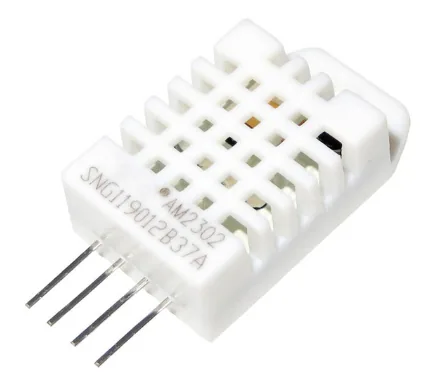
DHT22 specifications from the datasheet
| Parameter | Value |
|---|---|
| Supply voltage | 3.3 to 6 V DC (5 V typical) |
| Output | Digital signal on a single bus |
| Temperature range | -40 to 80 °C |
| Temperature accuracy | Better than ±0.5 °C |
| Humidity range | 0 to 100 %RH |
| Humidity accuracy | ±2 %RH (±5 %RH maximum) |
| Resolution | 0.1 °C and 0.1 %RH |
| Repeatability | ±0.2 °C and ±1 %RH |
| Humidity hysteresis | ±0.3 %RH |
| Long-term stability | ±0.5 %RH per year |
| Time between readings | 2 s or more |
| Start-up | Wait 1 s after power-up before the first reading |
Source: DHT22 (AM2302) datasheet.
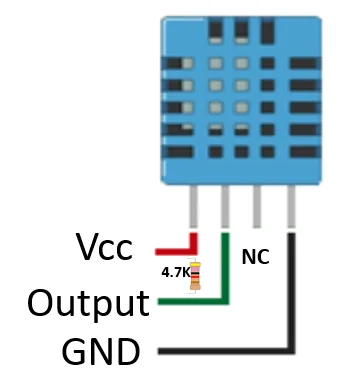
DHT22 pinout
| Pin | Name | Function |
|---|---|---|
| 1 | VDD | Supply, 3.3 to 6 V |
| 2 | DATA | Serial data, needs a pull-up resistor to VDD |
| 3 | NC | Not connected |
| 4 | GND | Ground |
The drawing shows the 4-pin package of the DHT family, with the pins counted from the left when you look at the grille. Breakout boards with 3 pins usually have the pull-up resistor on the board already.
Wiring the DHT22 to an M-Duino PLC
| DHT22 | M-Duino 21+ |
|---|---|
| Pin 1, VDD | 5 V pin of the PLC |
| Pin 2, DATA | Pin 2 (direct pin), with a 4.7 kΩ to 10 kΩ resistor between DATA and 5 V |
| Pin 3, NC | Not connected |
| Pin 4, GND | GND of the PLC |
- Power the PLC with 12 to 24 V DC as usual. The sensor takes its 5 V from the PLC, never from the 24 V supply.
- Connect DATA to a direct 5 V pin of the PLC, not to an industrial input such as I0.0. The industrial inputs are 24 V and input only, and the DHT22 data line goes in both directions at logic level.
- On the M-Duino 21+, pin 2 is the same microcontroller pin as the interrupt input I0.5. Use the direct Pin 2 connector, and check in the user guide of your model if the pin must be enabled with a switch. The OneWire guide lists the direct pins of each family.
- Keep the cable short and away from power cables. The datasheet gives up to 20 m of transmission, but a long single-wire line in a cabinet picks up noise.
Install the DHT library for Arduino
- In the Arduino IDE, open Sketch > Include Library > Manage Libraries and install DHT sensor library by Adafruit. Accept the dependency Adafruit Unified Sensor.
- Install the Industrial Shields boards (see how to install them in the Arduino IDE) and select Tools > Board > Industrial Shields AVR Boards > M-Duino family and the model M-Duino 21+.
The library handles the timing of the single-wire protocol, so the sketch only asks for the values.
Sketch: read humidity and temperature
#include "DHT.h"

#define DHTPIN 2       // Pin 2 of the M-Duino, where DATA is connected
#define DHTTYPE DHT22  // DHT22 (AM2302)

DHT dht(DHTPIN, DHTTYPE);

void setup() {
  Serial.begin(9600);
  Serial.println("DHT22 test");
  dht.begin();
}

void loop() {
  delay(2000);  // the DHT22 needs 2 s between readings

  float h = dht.readHumidity();
  float t = dht.readTemperature();      // degrees Celsius
  float f = dht.readTemperature(true);  // degrees Fahrenheit

  if (isnan(h) || isnan(t) || isnan(f)) {
    Serial.println("Failed to read from the DHT22");
    return;
  }

  Serial.print("Humidity: ");
  Serial.print(h);
  Serial.print(" %  Temperature: ");
  Serial.print(t);
  Serial.print(" *C ");
  Serial.print(f);
  Serial.println(" *F");
}
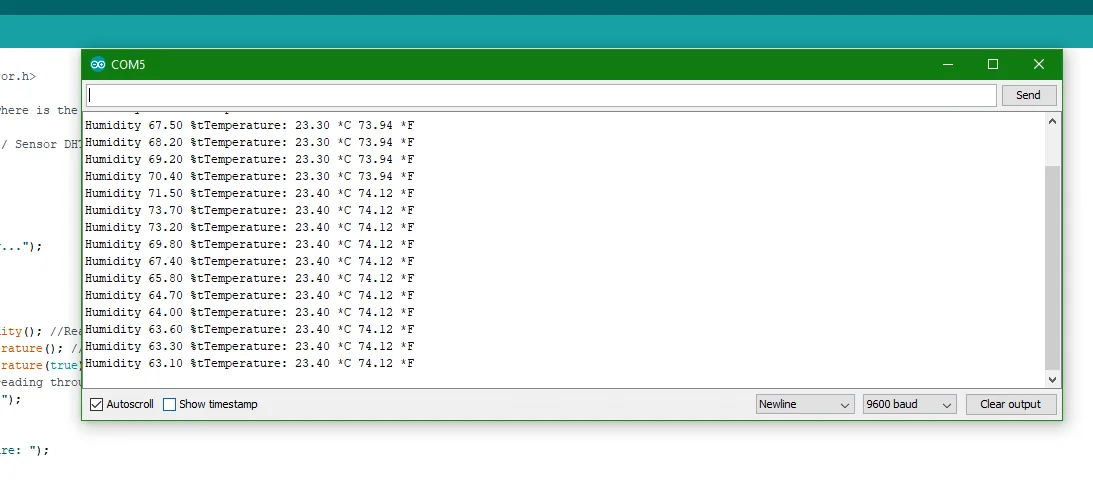
The sketch reads every 2 seconds, which is the minimum time between readings of the DHT22. If a reading fails, the library returns NaN and the sketch prints an error instead of a wrong value. This version compiles for the M-Duino 21+ with DHT sensor library 1.4.7. Open the Serial Monitor at 9600 baud to see the values.
DHT22 for tests, a transmitter for the plant
The DHT22 is a good sensor for prototypes, laboratories and the inside of a cabinet: it is small, simple to wire and accurate enough for comfort and storage conditions. For a production installation, a humidity and temperature transmitter with a 4-20 mA or Modbus RTU output is easier to wire over long distances, tolerates electrical noise better and can come with a calibration certificate. The PLC reads it on an analog input or on the RS-485 port, as in the Modbus RTU guide.
Temperature and humidity in real projects. In the data center case study, PLCs read temperature and humidity at the foot of each rack, find the hot spots and raise alarms, so the HVAC cools only where it is needed. In the cold storage simulator, a Raspberry PLC 21 runs a cold room with thermostat, defrost, door alarms and a cold chain record.
Read the data center case studyOpen the cold storage simulator
FAQ about the DHT22
Are the DHT22 and the AM2302 the same sensor?
Yes. The datasheet names the sensor DHT22 and AM2302. Some sellers use AM2302 for the version with wires and a case.
How often can I read the DHT22?
Once every 2 seconds at most. Faster readings return the previous value or fail.
Why do I get NaN or "Failed to read"?
Check the pull-up resistor on DATA, the 5 V supply and GND, that DHTPIN is the pin you wired and that DHTTYPE is DHT22 and not DHT11. Also wait 2 seconds between readings and 1 second after power-up.
Can I connect the DHT22 to a 24 V digital input of the PLC?
No. The sensor works at 3.3 to 6 V and its data line must be read and written by the microcontroller. Use a direct pin at 5 V.
What is the temperature range of the DHT22?
-40 to 80 °C, with an accuracy better than ±0.5 °C. Above 80 °C use another sensor, for example a PT100 or a thermocouple with a transmitter.
More sensors with a PLC
- Dallas DS18B20 temperature sensor with an Arduino PLC
- Reading temperature with a PT100 sensor
- ACS712 current sensor with an Arduino PLC
- IoT sensors: 25 types and how they connect to a PLC
- Industrial applications: 50 real examples by sector
See the inputs and outputs of the M-Duino 21+ and the rest of the Arduino PLC family.