Introduction
In this post you will learn how to test Ethernet communication on Arduino PLC and ESP32 PLC.
Requirements
Wiring
Your PLC must be connected to the router with an Ethernet crossover cable:
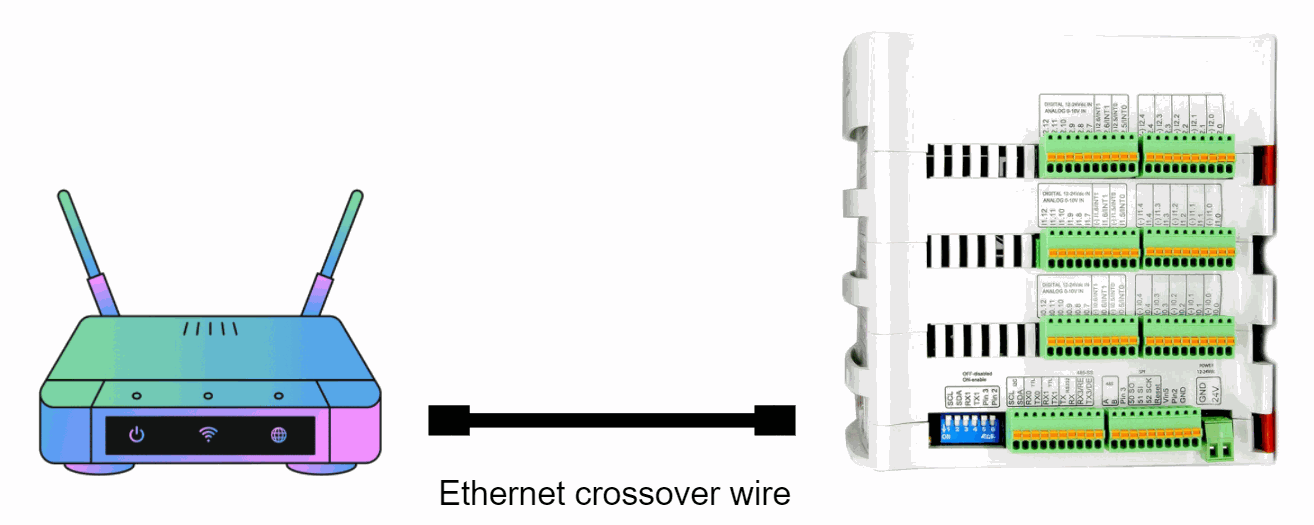
REMEMBER also that your PLC must be connected to the external 12/24Vdc power supply.
Software
The Ethernet.h library supports DHCP. Using Ethernet.begin(mac) with the appropriate network configuration, the Ethernet device will automatically get an IP address. This increases the size of the sketch significantly. To make sure that the DHCP lease is renewed correctly when needed, be sure to call Ethernet.maintain() regularly.
Accordingly, you have the DHCP version of the test:
/*
   Copyright (c) 2017 Boot&Work Corp., S.L. All rights reserved

   This program is free software: you can redistribute it and/or modify
   it under the terms of the GNU Lesser General Public License as published by
   the Free Software Foundation, either version 3 of the License, or
   (at your option) any later version.

   This program is distributed in the hope that it will be useful,
   but WITHOUT ANY WARRANTY; without even the implied warranty of
   MERCHANTABILITY or FITNESS FOR A PARTICULAR PURPOSE.  See the
   GNU Lesser General Public License for more details.

   You should have received a copy of the GNU Lesser General Public License
   along with this program.  If not, see <http://www.gnu.org/licenses/>.
 */

#include <Ethernet.h>

#define REMOTE "www.google.com"

const uint16_t port = 80;
uint8_t mac[] = {0xAA, 0xBB, 0xCC, 0xDD, 0xEE, 0x01};

EthernetClient c;

////////////////////////////////////////////////////////////////////////////////////////////////////
void setup() {
  Serial.begin(9600L);
  Serial.println("ethernet started");

  test();
}

////////////////////////////////////////////////////////////////////////////////////////////////////
void loop() {
  if (!c.connected()) {
    Serial.println("Disconnected");
    test();
  }
  delay(1000);
}

////////////////////////////////////////////////////////////////////////////////////////////////////
void test() {
  //if you need a DHCP IP use this configuration:
  Ethernet.begin(mac);

  switch (Ethernet.hardwareStatus()) {
    case EthernetW5100:
      Serial.println("W5100 found");
      break;

    case EthernetW5200:
      Serial.println("W5200 found");
      break;

    case EthernetW5500:
      Serial.println("W5500 found");
      break;

    default:
      Serial.println("Unknown hardware");
      break;
  }

  uint8_t MAC[6];
  Ethernet.MACAddress(MAC);
  for (int i = 0; i < 6; ++i) {
    if (i > 0) {
      Serial.print(':');
    }
    Serial.print(MAC[i], HEX);
  }
  Serial.println();

  //use this block with DHCP IP:
  Serial.println(Ethernet.localIP());
  if (Ethernet.localIP() == IPAddress({0,0,0,0})) {
    Serial.println("Local IP FAIL");
  } else {
    Serial.println("Local IP OK");
    if (c.connect(REMOTE, port)) {
      Serial.println("Remote connection OK");
    } else {
      Serial.println("Remote connection FAIL");
    }
   }
}
On the other hand, there is a code version with fixed configuration parameters, where you can define them according to your needs. The parameters must be defined in the Ethernet.begin() function following the format explained on the official website. REMEMBER that the PLC does not have by default neither the MAC, nor the IP, nor any of the other parameters of the function, so you will have to define them according to the standards and your network configuration.
/*
   Copyright (c) 2017 Boot&Work Corp., S.L. All rights reserved
   This program is free software: you can redistribute it and/or modify
   it under the terms of the GNU Lesser General Public License as published by
   the Free Software Foundation, either version 3 of the License, or
   (at your option) any later version.
   This program is distributed in the hope that it will be useful,
   but WITHOUT ANY WARRANTY; without even the implied warranty of
   MERCHANTABILITY or FITNESS FOR A PARTICULAR PURPOSE.  See the
   GNU Lesser General Public License for more details.
   You should have received a copy of the GNU Lesser General Public License
   along with this program.  If not, see <http://www.gnu.org/licenses/>.
 */
#include <Ethernet.h>
#define REMOTE "www.google.com"
uint8_t mac[] = {0xAA, 0xBB, 0xCC, 0xDD, 0xEE, 0x01};
uint8_t ip[] = {192, 168, 1, 110};
uint8_t dns[] = {192, 168, 1, 1};
uint8_t gateway[] = {192, 168, 1, 1};
uint8_t subnet[] = {255, 255, 0, 0};
uint8_t names[] = {8, 8, 8, 8};
const uint16_t port = 80;
EthernetClient c;
////////////////////////////////////////////////////////////////////////////////////////////////////
void setup() {
  Serial.begin(9600L);
  Serial.println("ethernet started");
  test();
}
////////////////////////////////////////////////////////////////////////////////////////////////////
void loop() {
  if (!c.connected()) {
    Serial.println("Disconnected");
    test();
  }
  delay(1000);
}
////////////////////////////////////////////////////////////////////////////////////////////////////
void test() {
  //if you need an static IP use this configuration (be carefuful with IP conflicts):
  Ethernet.begin(mac, ip, dns, gateway, subnet);

  switch (Ethernet.hardwareStatus()) {
    case EthernetW5100:
      Serial.println("W5100 found");
      break;
    case EthernetW5200:
      Serial.println("W5200 found");
      break;
    case EthernetW5500:
      Serial.println("W5500 found");
      break;
    default:
      Serial.println("Unknown hardware");
      break;
  }
  uint8_t MAC[6];
  Ethernet.MACAddress(MAC);
  for (int i = 0; i < 6; ++i) {
    if (i > 0) {
      Serial.print(':');
    }
    Serial.print(MAC[i], HEX);
  }
  Serial.println();

  //use this block with static IP:
  Serial.println(Ethernet.localIP());
  if (Ethernet.localIP() != IPAddress(ip)) {
    Serial.println("Local IP FAIL");
  } else {
    Serial.println("Local IP OK");
    if (c.connect(REMOTE, port)) {
      Serial.println("Remote connection OK");
    } else {
      Serial.println("Remote connection FAIL");
    }
  }
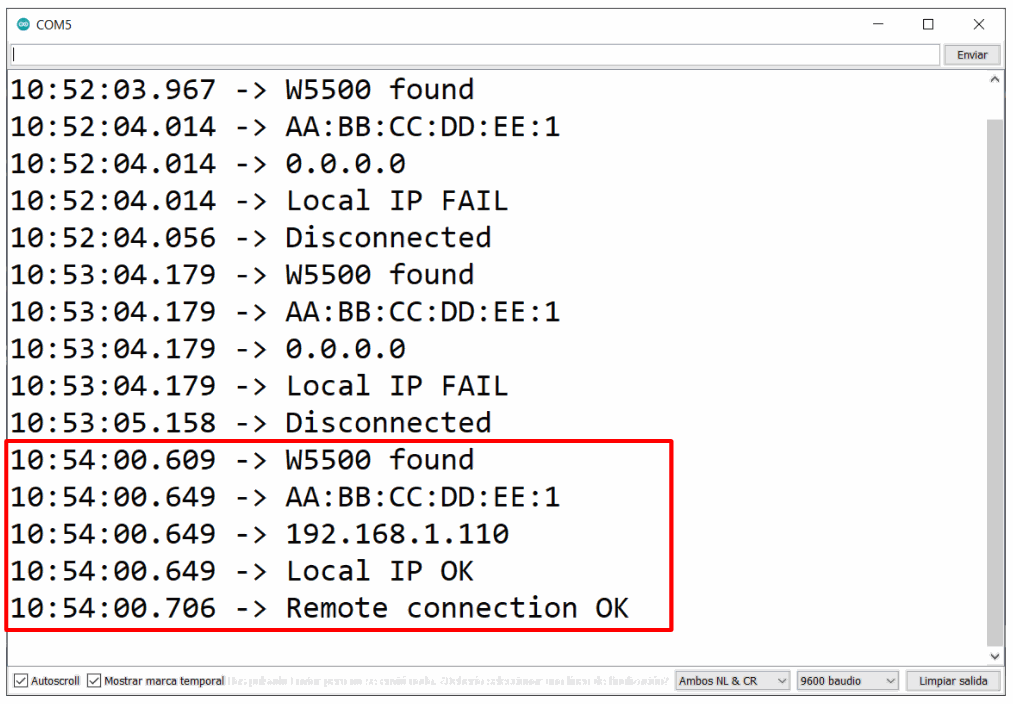
In both tests you must see the successful messages on the Serial Monitor as a passed test result: